
8-Bit Tower Defense Player Levels, Squad Slots and Rewards
Raise your player level in 8-Bit Tower Defense to bring more units into your squad and claim milestone rewards.
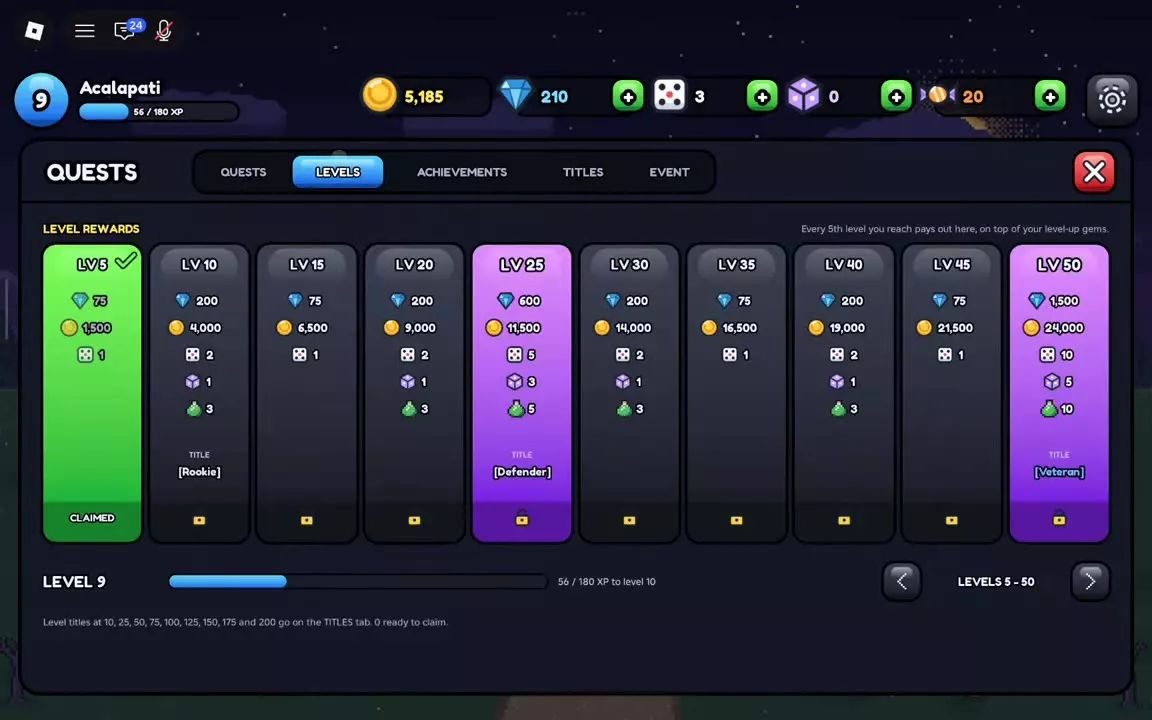
You start with three squad slots. Account levels 5, 15 and 30 unlock the fourth, fifth and sixth slots. Open Quests → Levels to claim rewards at five-level milestones.
Account Levels, Unit XP and Pass XP
Open Play → Story, choose an available act and win to advance your account level. Check the victory screen, then continue through the newly unlocked acts. In one first-clear Normal run through Greenfield Outpost, the player finished Acts 1, 2 and 3 at account levels 4, 6 and 8 respectively; those levels describe that run, not a fixed award for each act.
Account level unlocks squad slots and level milestones. Unit XP levels the units in your squad, while Tide Pass XP advances the pass reward track. They are separate progress systems. See the Greenfield Normal guide for the early acts, unit leveling for growing individual units, and the Tide Pass guide for pass rewards.
Unlock the Fourth, Fifth and Sixth Squad Slots
| Account level | Squad slots |
|---|---|
| Starting | 3 |
| 5 | 4 |
| 15 | 5 |
| 30 | 6 |
After reaching a slot's level requirement, open UNITS and drag a unit into the unlocked slot, or open the unit's details and select ADD TO SQUAD. Extra squad slots let you bring more different units into battle.
Unit storage is separate: expanding your inventory gives you room to keep more units, but does not add squad slots. See unit storage for capacity and collection management.
Claim Level Milestones from 5 to 50
Open Quests → Levels after reaching a milestone. Select Claim for an available reward or Claim All to collect available rewards together. Use Next to Claim and the page controls to navigate the list. Milestone rewards are separate from the Gems earned when leveling up.
| Level | Gems | Gold | Trait Rerolls | Stat Rerolls | Wild Essence | Title |
|---|---|---|---|---|---|---|
| 5 | 75 | 1,500 | 1 | — | — | — |
| 10 | 200 | 4,000 | 2 | 1 | 3 | Rookie |
| 15 | 75 | 6,500 | 1 | — | — | — |
| 20 | 200 | 9,000 | 2 | 1 | 3 | — |
| 25 | 600 | 11,500 | 5 | 3 | — | Defender |
| 30 | 200 | 14,000 | 2 | 1 | 3 | — |
| 35 | 75 | 16,500 | 1 | — | — | — |
| 40 | 200 | 19,000 | 2 | 1 | 3 | — |
| 45 | 75 | 21,500 | 1 | — | — | — |
| 50 | 1,500 | 24,000 | 10 | 5 | 10 | Veteran |
Open Titles to select an unlocked title for display in chat.
Choose Your Next Reward Track
| Track | Goal |
|---|---|
| Login | Claim seven-day rewards |
| Daily and weekly quests | Complete recurring objectives |
| Achievements | Complete long-term goals |
| Titles | Unlock chat titles |
| Tide Pass | Earn pass XP and rewards |
| Weekly leaderboards | Compete for top placements |
The seventh login reward includes Chill Capybara; a missed day pauses the streak rather than resetting it. Top weekly leaderboard players receive Crowned Seahorse.
Use quests and login rewards to plan recurring objectives, achievements and titles for long-term requirements, and the Tide Pass guide to compare its free and Premium tracks.
FAQ
Does HITS AIR mean a unit can be placed on hills?
No. HITS AIR describes which enemies the unit can attack. Hill placement has a separate eligibility rule. If the preview says Hills are for flying units, choose an eligible unit or move onto valid ground beside the hill. See placement rules.
Does leveling a unit unlock more squad slots?
Squad slots depend on account level, not an individual unit's level. Account levels 5, 15 and 30 unlock the fourth, fifth and sixth slots. Unit XP levels individual units, while Tide Pass XP advances the pass. See player progression.
Is a ten-pull cheaper than ten single summons?
At base prices, Featured and Standard cost 50 Gems per single or 500 per ten-pull, so the currency cost is equal. A ten-pull guarantees at least one Epic or higher. VIP reduces both prices by 20%, to 40 Gems per single or 400 per ten-pull. See summoning prices and guarantees.