8-Bit Tower Defense Beginner Guide
Start 8-Bit Tower Defense by defending the training road, choosing a starter and building a squad for your first story battle.
Complete all four training waves and choose one starter to keep. Use the onboarding Gems for a 10-unit summon, equip your available squad slots, and enter the first story battle through PLAY. Afterward, follow the LEVEL and TRAITS prompts in the lobby.
Complete the Four Training Waves
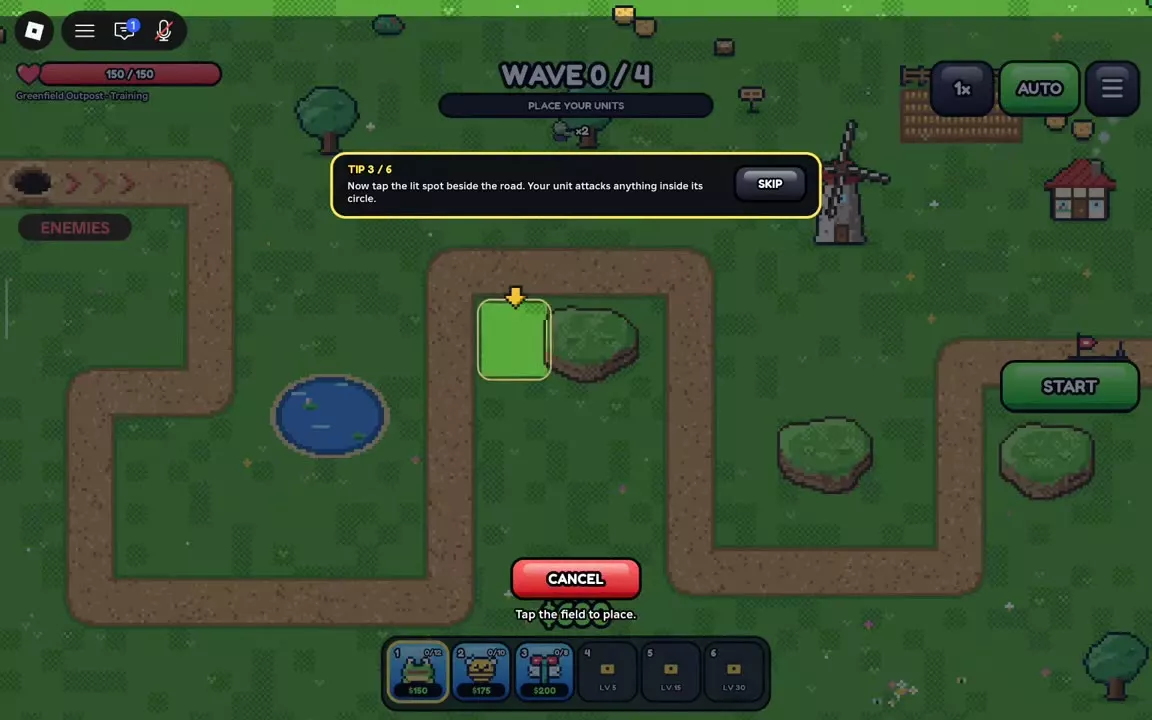
Enemies follow the road from their entrance toward the outpost. Place units beside the road so their attack ranges cover it; deployed units automatically attack enemies in range.
- Select Pebble Frog and place it on the highlighted ground for $150.
- Place Honey Bee for $175 and Dart Dragonfly for $200 as prompted. Training starts with $600, leaving $75 after all three placements.
- Press START to send the first wave. Defeat enemies to earn battle cash.
- Select a deployed unit and press UPGRADE when you have enough cash. Hold the road through wave 4 to complete training.
The three units are available for the training battle; afterward, you choose one to keep. Training's $600 starting cash is specific to that battle: solo Normal Greenfield Outpost Act 1 starts with $1,000.
Choose Your Permanent Starter
Choose Pebble Frog for a cheap, long-range opening. Pick one of the others if you prefer their attack style:
- Pebble Frog — $150: Attacks one enemy at a time from long range. Its third battle upgrade adds armor piercing.
- Honey Bee — $175: Attacks quickly and gets stronger for each other bee on the battlefield, making it a good choice if you want to place several bees.
- Dart Dragonfly — $200: Attacks one enemy at a time and fires a rapid three-dart burst every fourth attack. Its third battle upgrade adds armor piercing.
All three can attack flying enemies. Confirm your choice to keep that starter permanently; you can summon the others later.
Summon Units and Fill Your Squad
- Open SUMMON and use the 500 Gems provided during onboarding on SUMMON ×10. The 10-unit summon guarantees at least one Epic or higher unit; the particular units you receive can differ.
- Press DONE on the results, close SUMMON and open UNITS.
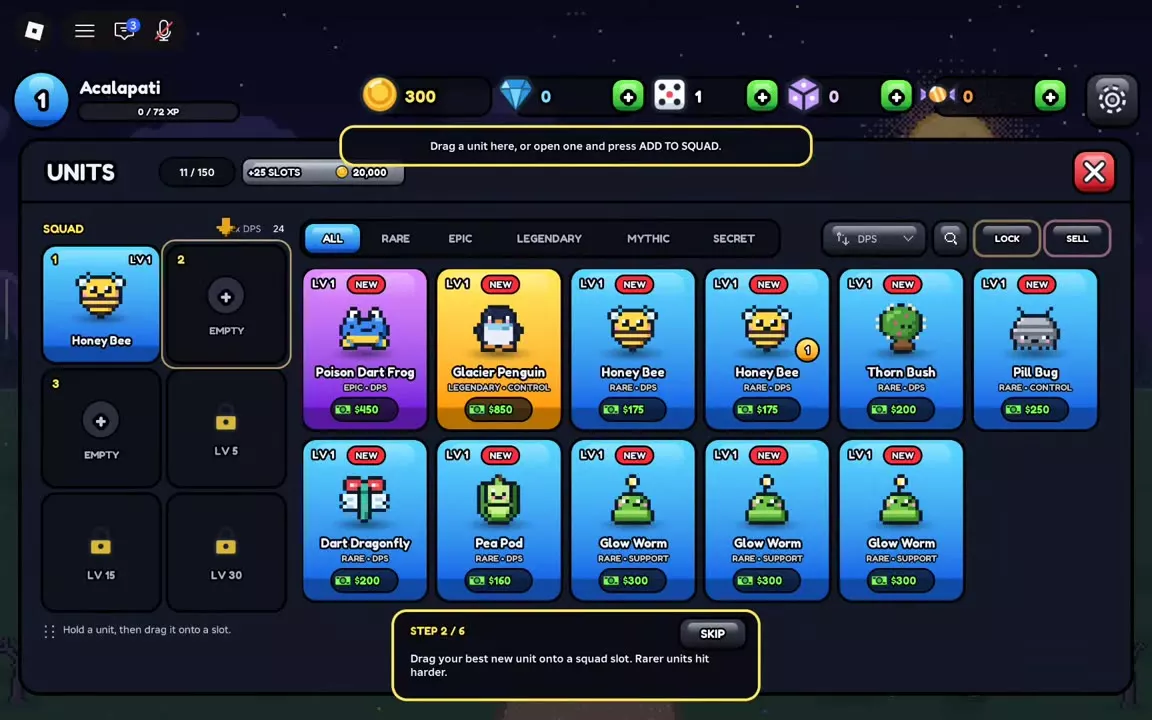
- Drag units into your open squad slots, or select a unit and press ADD TO SQUAD. Your equipped units appear on the battle hotbar.
- Fill the slots available to your account. Locked slots show their required account level; the fourth slot opens at level 5.
For example, if you have Honey Bee, Poison Dart Frog and Glacier Penguin, you can equip all three to bring damage and control into the first battle. For other pulls, use your available damage units and add control if you have it. See early squad building for more ways to fill gaps and summoning for banner details.
Start Your First Story Battle
- Close UNITS, press PLAY, and enter Greenfield Outpost Act 1 on Normal.
- Select a squad card and place a unit on valid ground beside the road, where its range covers approaching enemies. Place affordable damage early.
- Press START. Spend cash earned during the battle on more coverage and upgrades; select a placed unit to use UPGRADE.
- Add control if your squad has it and keep damage covering the road for the fast Runners that appear with the wave 3 warning. Continue upgrading and defend against Scarecrow on wave 8.
If you have the units, Honey Bee and Poison Dart Frog can provide damage while Glacier Penguin adds control. Adapt the placements to the units you summoned and the cash available. For more placement and battle controls, see the combat guide.
Complete the Level and Trait Prompts
After your first battle, follow the lobby prompts to improve a unit:
- Open UNITS, select a unit, then open LEVEL and press LEVEL UP to use Gold for leveling.
- Open the unit's TRAITS tab and press REROLL to use a Trait Reroll. The onboarding provides 500 Gold and two Trait Rerolls for these growth prompts.
- Check the unit collection for discovery rewards and Quests for completed objectives you can claim.
As you continue playing, see unit leveling for growth choices, traits for their effects, and player levels and rewards for more squad slots.
FAQ
Does HITS AIR mean a unit can be placed on hills?
No. HITS AIR describes which enemies the unit can attack. Hill placement has a separate eligibility rule. If the preview says Hills are for flying units, choose an eligible unit or move onto valid ground beside the hill. See placement rules.
Does leveling a unit unlock more squad slots?
Squad slots depend on account level, not an individual unit's level. Account levels 5, 15 and 30 unlock the fourth, fifth and sixth slots. Unit XP levels individual units, while Tide Pass XP advances the pass. See player progression.
Is a ten-pull cheaper than ten single summons?
At base prices, Featured and Standard cost 50 Gems per single or 500 per ten-pull, so the currency cost is equal. A ten-pull guarantees at least one Epic or higher. VIP reduces both prices by 20%, to 40 Gems per single or 400 per ten-pull. See summoning prices and guarantees.